Local image input
Drag and drop one image or multiple time-point images. PNG, JPEG, BMP, GIF, and WebP are browser-friendly.
Cytomove is a local-first browser workspace for wound healing scratch assay images: single images, groups, masks, plots, and exports. Your microscopy images stay on your device.
The web app is the default entry point. It is meant for quick local analysis, figure checks, grouped time courses, and export without installing anything.
Drag and drop one image or multiple time-point images. PNG, JPEG, BMP, GIF, and WebP are browser-friendly.
Brightfield and phase presets, threshold level, variance radius, component filtering, FOV crop, and rotation tools.
Wound area percentage, mean and median width, width spread, valid rows, area-width fit, and closure summaries.
Review grouped images, preview time-course cards, open area and width plots, and export plot ZIP files.
Add scan, fill area, erase scan, clean specks, undo edits, and reset correction when the automatic mask needs review.
Segmentation quality score, warnings, component counts, continuity checks, and recommended primary metric.
Download PNG overlays, group PNG ZIPs, plot ZIPs, CSV data, and Excel-compatible tables.
Open images normally, then analyze them in the browser. The current web workflow keeps assay image files on your device.
Open the web app, load images, review the output, then export the pieces you need.
Use the toolbar or drag and drop. One file opens single mode; multiple files create a group.
Check contours or masks, adjust segmentation, crop, rotate, and apply manual correction if needed.
Save overlays, plots, CSV, or Excel tables for reporting and validation notes.
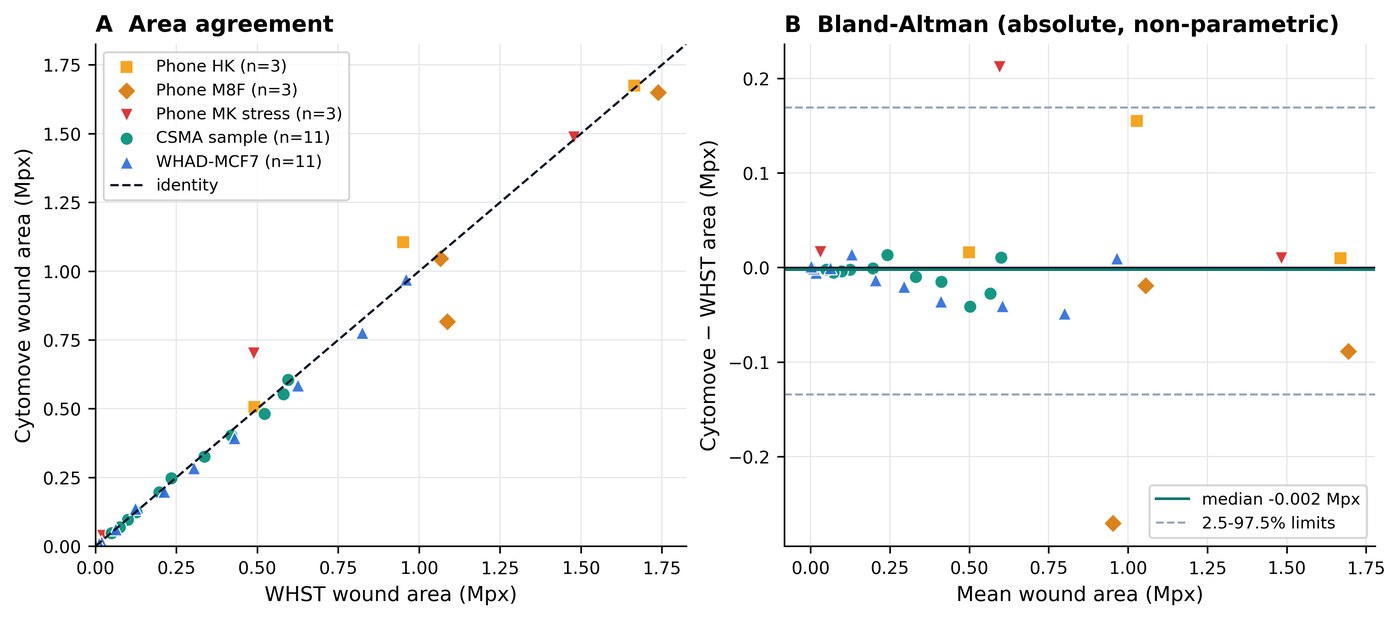
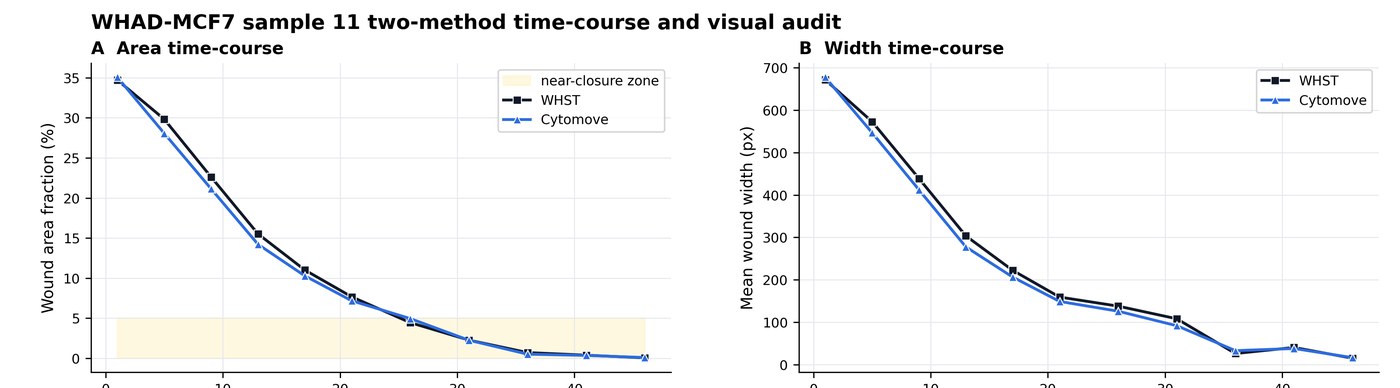
Cytomove was evaluated against ImageJ/Fiji Wound Healing Size Tool outputs across 31 paired measurements from five image sets. In the clean brightfield comparator sequence, Cytomove closely reproduced WHST wound-area trends (Pearson r = 0.9975), while keeping each segmentation visible as an overlay before export.
Thank you for using Cytomove. I hope it is useful in your work. Please remember to cite the bioRxiv preprint when you use it in your analysis, figures, or methods. Duzgun, Z. (2026). Cytomove: a browser-local and reviewable workflow for scratch wound healing assay quantification. bioRxiv. https://doi.org/10.64898/2026.06.06.730617
The web app stays the main public path. The Windows desktop app adds faster local group workflows and heavier ZIP exports, and is available to verified academic access accounts - just sign in to download.
Report a difficult image, ask a question, or suggest what would make Cytomove more useful in your scratch assay workflow.